HR departments handle many important conversations every day, such as hiring interviews, performance reviews, and employee complaints. A clear record of these conversations is essential for many reasons, not least compliance. But what is the best way to record and transcribe these conversations?
The HR conversation is the most valuable source of data, but it is often the least reliably captured. It's natural for interviewers to expect a notetaker in the room. But if the HR platform doesn't have one, they'll bring in their own, whether that's a recording tool, a transcription service, or simply a document open alongside the interview.
The challenge facing HR Tech product teams is that the HR conversation happens outside the system of record, and the platform is left with whatever someone remembers to type in afterwards. Manual logging doesn't solve the problem, and post-meeting notes may often be incomplete, inconsistent, or never get written-up at all.
The challenge of fragmented data
The result is a fragmented record of the conversation, with missing data that can impact on everything built on top of it, from candidate scoring to interview feedback, and appraisal insights to AI-powered workflows. Missing data can also lead to legal and compliance issues.
That's why native HR conversation capture is becoming a vital product requirement, rather than just an add-on feature. ATS (Applicant Tracking System) platforms are already adding interview-note and transcription capabilities. HR Tech product teams face the challenge of building this into their platforms reliably and securely, while minimizing engineering time and resource.
What to consider before building
Recording an HR conversation isn't simply a matter of putting an AI bot into a video call. HR Tech product teams need to make some key decisions around consent, data residency, capture, storage and how much of the underlying conversation they need to retain, and where.
Who handles consent?
Fundamentally, the platform should own the consent process. Your product knows the type of conversation taking place, the participants and the jurisdictions involved. Notice, consent and the ability to define capture need to be part of the whole product experience, rather than something delegated to a separate recording tool.
Do you need the raw transcript?
In most HR use cases, the answer is yes. A summary is useful, but ultimately it is just an interpretation of the full conversation. If a model decides what was important in a performance review or interview, that decision becomes part of the data layer. Keeping the raw, speaker-attributed transcript alongside the summary gives a product one source of the truth that can support search, review, scorecards and any AI workflows.
Does an AI bot need to join the meeting?
A dedicated meeting agent provides one consistent capture path across supported conferencing platforms. It also means the integration can be presented as part of your own product, rather than asking users to adopt another third-party recording tool. For security and procurement teams, having a single infrastructure path can also simplify the review process.
Where will the recording live?
Data residency can be a procurement requirement before it becomes a technical consideration.
An HR platform serving customers across multiple jurisdictions may require recordings and transcripts to remain within a specific region. The architecture needs to support that from the beginning, rather than treating regional storage as an afterthought.
When does capture happen?
Capture should be tied to the meeting lifecycle. If an interview is rescheduled, the recording agent needs to follow the event, rather than turning up at the original time. Connecting capture to the calendar event gives the platform a reliable relationship between the scheduled conversation and the data produced.
Build conversation capture into your HR Tech platform with Cronofy
Cronofy's Meeting Transcripts capability provides a single API for recording, transcribing and summarizing meetings across Zoom, Google Meet and Microsoft Teams. The agent can join immediately when provided with a conference URL, at a specified time, or be attached directly to a calendar event.
When the event changes, the agent stays associated with the correct session. That gives HR Tech product teams flexibility over how they integrate meeting capture without having to build separate integrations for each stage of the workflow.
Once the agent joins, a product can receive structured meeting data including:
- Audio and video recordings ready for in-app playback
- Speaker-attributed transcripts with timestamps
- AI-generated summaries that can surface key points and next steps
- Structured JSON that can feed existing product workflows and data models
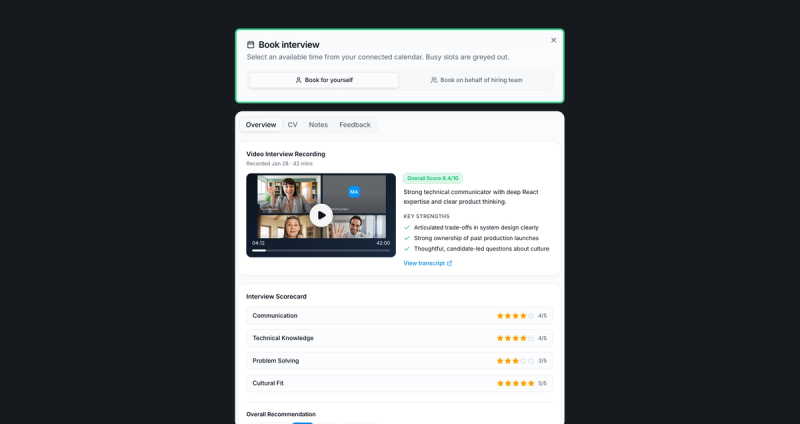
The transcript and recording can become the underlying evidence, while your own product intelligence layer decides what to do with them. For an interview product, that could mean automatically populating scorecards. For performance management, it could mean generating a review summary while retaining the transcript for reference. For employee workflows, meeting data could trigger follow-ups or populate records without requiring someone to manually re-enter the information.
Infrastructure matters as much as AI
HR conversation capture is ultimately a data infrastructure problem as much as an AI issue. Meeting Transcripts runs on Cronofy's integrated infrastructure, with recording and transcription handled without third-party subprocessors behind those services.
For compliance and security, recordings and transcripts are stored in the data center the customer chooses, across the UK, US, Canada, Germany, Australia and Singapore. Transcription itself may be processed in another region of the same cloud provider, such as the EU region for the UK data center.
Transcription can also be the primary capture layer, with video optional, useful where users want the benefits of searchable conversation data without necessarily retaining video.
Recordings are deleted after seven days, and transcripts are not used to train AI models.
The result is a relatively simple architecture for product teams. One API call provides the recording, transcript and summary as structured data, across Zoom, Google Meet and Microsoft Teams, with support for 30+ languages.
Keep the intelligence layer inside your product
For HR Tech product teams, probably the most important architectural decision may be what to do with the data once it has been captured. A meeting agent shouldn't have to become the intelligence layer for your HR product. Capture the underlying conversation reliably, retain the raw transcript alongside derived summaries, and let your own application determine how that data powers workflows and decisions.
That's the key difference between adding a recording feature and building a conversation data layer. When the HR conversation stays inside your product, it becomes available not just for today's notes, but for the scorecards, workflows, insights and AI experiences that your team builds for the future.
See how Cronofy handles meeting recording and transcription: explore Meeting Transcripts.