What is the Google Calendar API, and what's it good at?
Google's own API is used for reading and writing events, checking free/busy and receiving change notifications on Google accounts. It is free, well documented and capable within that scope.
For product teams, the Google Calendar API is the right choice where the requirement is for one calendar provider, simple one-to-one booking, no multi-person availability, no rescheduling logic and no compliance surface of your own.
The harder question is what happens when your product needs a second provider, or a customer sends over a security review.
Why look for a Google Calendar API alternative?
The biggest limitation of building directly against one calendar provider is that your customers don't necessarily use that provider, or use it exclusively. As you encounter other calendar environments, such as Microsoft 365, Outlook and Exchange, scheduling requirements become much more sophisticated: coordinating multiple interviewers, respecting working hours, preventing double bookings and keeping availability accurate when calendars change.
This matters particularly in enterprise sales. A recruiting platform might work perfectly with Google Calendar during development, only to discover that a prospective customer runs entirely on Microsoft 365. Supporting both means integrating with multiple APIs, authentication systems and data models. It also involves dealing with differences in how providers represent events, availability, recurring meetings, permissions and updates.
Meeting the challenges
There are multiple challenges with the Google Calendar API that product teams need to be aware of. Arguably the most critical is that free/busy is not availability. Google doesn't resolve a time that works across, say, five interviewers, each with their own working hours, buffers and time zone, plus sequenced interviews. Google gives you busy blocks per calendar, and everything after that (time zones, working hours, applying the rules, finding a slot that works for everyone) is down to your team to build.
Other challenges include:
- Google changes the API periodically, so the team needs to watch the changelog and update the implementation before something breaks, a standing cost that might not have been scoped in the beginning.
- The Google Calendar API supports Google accounts only, so the first customer on Microsoft 365, Apple or on-premise Exchange is a separate integration to build, test and maintain. This is the trigger that can disrupt dev roadmaps.
- Google records a booking as a point in time, so keeping your own record accurate as the meeting moves, with conferencing and transcripts attached, is all yours to build.
- Usage quotas that never trouble a test environment can start returning errors once real customers scale up.
- Google holds extensive certifications for its own services, but responsibility for your integration's compliance scope and data residency lies with you. For anyone selling into regulated or enterprise buyers, this is the line that disrupts the DIY conversation.
Three routes product teams can take
1. Build wider
Keep Google and add Microsoft Graph, then Apple, then on-premise Exchange, one integration at a time.
This fixes provider coverage and nothing else. Graph is free and gives a single endpoint across calendars, mail, contacts and files, but its surface is too large for a team that only wants calendars, it changes often enough that breaking changes are a live risk, and complex multi-attendee workflows are still custom-built.
What it leaves you with is several provider integrations to maintain instead of one, with availability across people, rescheduling and compliance scope untouched.
It suits teams with one or two providers, simple bookings, and engineering capacity that can be committed indefinitely.
2. Move to a unified API
One integration that reaches every major provider, typically with availability lookups and some UI components on top.
This fixes provider coverage and change management in one step, but check before assuming it fixes the rest. Options teams often compare include:
- Nylas, which covers calendar, email and contacts from one vendor. Its back end relies on live calls to each provider, so latency is worth testing on your heaviest multi-calendar queries.
- Cal.com, which often comes up in the same evaluations, although it is an open-source scheduling platform rather than a unified API. It supports round-robin out of the box, but its flow asks end users to create an account and verify their email, and self-hosting means your team owns updates and uptime.
It suits products that need breadth of coverage more than depth of scheduling logic.
3. Move to infrastructure
This route looks at what sits underneath the endpoints, which is where Cronofy works.
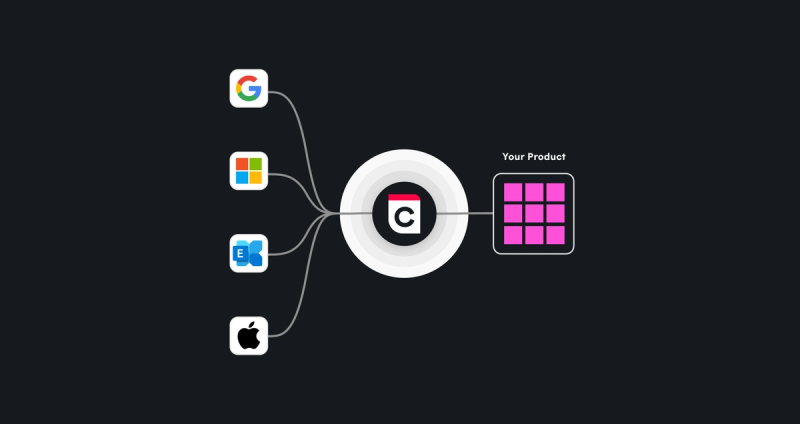
The two routes above get you to the calendar. This one covers what happens for the whole life of the meeting. Cronofy provides Calendar Connectivity for authorized, synced access across Google, Microsoft, Apple and on-premise Exchange, with Enterprise Connect for organization-wide authorization and free/busy-only access when a security review demands it.
The Sync Engine returns free/busy across many calendars in one call and keeps serving through a provider outage. Calendar Events and Calendar Webhooks keep your records accurate as meetings move. Scheduling (Embedded, Headless or both) and Scheduling Controls are available when the product needs booking flows and admin rules.
Meeting Transcripts and Conferencing are on the same infrastructure, so adding them later builds on the integration you already have.
It suits platforms where scheduling is core to the product.
For feature-by-feature scoring, see the best calendar APIs for developers.
Choosing the right route
Calendar integration used to be a checkbox: connect a calendar and create an event. Today, products such as hiring tech and HR suites need to understand availability, coordinate people, respect organizational constraints and turn that information into scheduling that works for everyone involved.
Building directly on the Google Calendar API can be the right choice if your requirements are narrow, your customers are predominantly Google users, and your team wants complete ownership of the integration.
But if your dev roadmap includes enterprise calendar coverage, multi-person scheduling and reliable real-time availability, building every integration yourself can quickly become expensive. It can take 6–9 months to build, and around 42% of engineering time to maintain. The goal should be to make scheduling feel effortless for users without making calendar infrastructure a permanent engineering burden.
That's where Cronofy's infrastructure fits, with unified calendar sync and real-time availability across every major provider, so your developers can focus on the parts of the product that set it apart.
Start building
Sign up and connect up to 20 accounts for free, with 24 hours of meeting recording included. No credit card required.
What is the Google Calendar API?
The Google Calendar API lets applications programmatically access and manage Google Calendar data, including calendars, events, attendees, recurring meetings and availability.
Does the Google Calendar API work with Outlook or Apple Calendar?
Not directly. The Google Calendar API is designed to access Google Calendar accounts and Google Workspace calendars. To support Outlook/Microsoft 365 or Apple/iCloud calendars, a product generally needs additional integrations, or a calendar layer that connects multiple providers.
Why do teams move off the Google Calendar API?
Teams often outgrow a single-provider API when they need to support Google, Microsoft and other calendars without building and maintaining separate integrations. They may also want simpler cross-calendar availability, synchronization, OAuth, webhooks and edge-case handling from shared scheduling infrastructure, rather than maintaining it themselves.
Can the Google Calendar API handle multi-person availability?
Not on its own. Its FreeBusy endpoint returns busy blocks per calendar, so working hours, buffers, time zones and finding a slot that suits several people all have to be built on top.
What is the best alternative to the Google Calendar API?
For a product that needs to support both Google Workspace and Microsoft 365, such as hiring tech or an HR suite, calendar infrastructure such as Cronofy is often a better fit than integrating each provider separately. The best choice depends on whether your priority is scheduling, broad provider coverage, sync reliability or control over the underlying calendar data.
Is the Google Calendar API free?
Yes, standard usage of the Google Calendar API currently has no additional API charge, subject to usage quotas.
What are the best calendar APIs for developers in 2026?
What is a unified API? And when you need one